AdCenter : Google Adwords Targeting
Google Adwords Targeting (Advanced)
If you already use Adwords to advertise, or want ultimate control over your ad campaign, please read this section.
Google AdWords is the top provider of advertising on this website and all the sites in the AutoShrine Network.
By using Google AdWords, you get fine control over your advertising budget, the ability to display your ads only to certain geographical regions or audiences, or only on pages containing specified keywords (for example, only on pages that mention products relevant to your business). You also get an advanced reporting interface to track the number of impressions, clicks and conversions your ads are generating.
To display your ad on any of the ASN sites, you will need to have a Google AdWords account, then create a campaign using placement targeting as described in the steps below.
The following sites may be targeted via AdWords:
Click on a site name to be taken to the DoubleClick Ad Planner for that website.
| Channel Name | Channel ID | Target Domain | Monthly Page Views † |
|---|---|---|---|
| All AutoShrine Network Sites | 6703259145 | *everything below* | 2.3 million |
| The MG Experience | 3211451629 | mgexp.com | 1.8 million |
| The Triumph Experience | 9685318642 | triumphexp.com | 235,000 |
| Rally Anarchy | 7110298776 | rallyanarchy.com | 103,000 |
| The Jaguar Experience | 6413656548 | jagexp.com | 20,000 |
| The Morris Minor Forum | - | morrisminorforum.com | 18,000 |
| The Austin-Healey Experience | - | ahexp.com | 15,000 |
| Corrado World | 1299287691 | corradoworld.com | 15,000 |
| MX5 Miata World | 8184667824 | mx5world.com | 4,000 |
† Approximate impressions per month, as of June 2012.
To advertise on this site, please follow the following steps:
- Sign in or create a new account at Google AdWords
You will be required to make an initial deposit to your account or enter a credit card. - Create a new Placement Targeted AdWords Campaign.
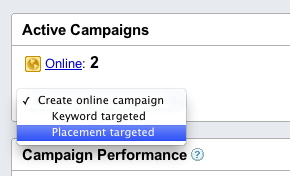
Note: If you only want your ad to display on the websites that you select, in the Campaign Settings tab, use the following settings:
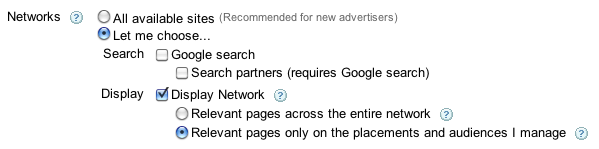
- Navigate to the Network tab for your new Campaign and show the Managed placements section if it is hidden.
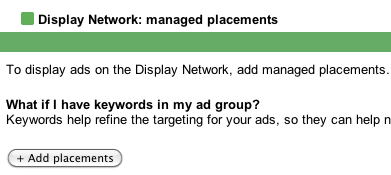
- Click the "+ Add Placements" button.
- Enter the domain names from the table below for all the sites you wish to advertise on.
For example, to advertise on The MG Experience and The Triumph Experience, you would enter the following:
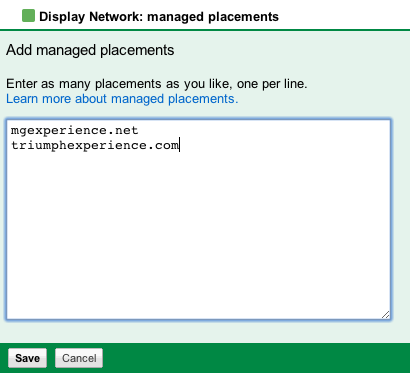
Then click the "Save" button. - Your ads should begin to appear on the sites shortly, depending on your campaign budget.
Check your campaign statistics in 12 to 24 hours to verify they are being displayed and check their performance.
† Monthly Impressions are an estimate only. The number of active banners and website visitors in a given month will determine actual impressions.
If you have any questions, please email the webmaster